
Average Customer Review:
 |
||

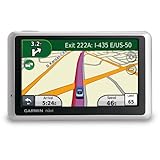

Garmin nüvi 1350LMT 4.3-Inch Portable GPS Navigator with Lifetime Map & Traffic Updates
an used car
cheapest deals price black friday's deals and discount
nüvi 1350LMT features FREE lifetime map and traffic updates..../ Garmin nüvi 1350LMT 4.3-Inch Portable GPS Navigator with Lifetime Map & Traffic Updates / an used car
The widescreen nüvi 1350LMT adds free Lifetime Maps and Traffic to the nüvi 1350. In addition, this thin GPS announces streets by name, guides you to the proper lane for navigation, offers pedestrian navigation options and calculates a more fuel-efficient route with ecoRoute. Add free lifetime maps and traffic to the feature-packed nüvi 1350. Traffic information is updated constantly, and map updates are available up to 4 times a year, with no subscription, fees, or expiration dates. Travel tools include JPEG picture viewer, world travel clock with time zones, currency converter, measurement converter, calculator and more. Simply tap the screen for your exact coordinates, the nearest address/intersection, and the closest fuel and emergency services. Includes Free Lifetime Map and Traffic Updates Navigate City Transit Take It With You Know the Lane Before It's Too Late See More Get Turn-by-Turn Directions Go Beyond Navigation nüvi 1350; Preloaded City Navigator NT North America (U.S and Canada); Lifetime Maps and Traffic; FM Traffic Receiver With Vehicle Power Cable; Vehicle Suction Cup Mount; USB Cable; Dashboard Disc; Quick Start Manual
.../ Garmin nüvi 1350LMT 4.3-Inch Portable GPS Navigator with Lifetime Map & Traffic Updates / an used car
Garmin nüvi 1350LMT 4.3-Inch Portable GPS Navigator with Lifetime Map & Traffic Updates
an used car
Customers Who Bought This Item Also Bought......


Affordable, Widescreen GPS Navigator With Lifetime Maps and Traffic
With free Lifetime Map and Traffic updates, you always have the most up-to-date maps, points of interest and navigation information available at your fingertips. Traffic information is updated constantly, and map updates are available for download up to 4 times a year. Both features are ready to go, right out of the box, with no subscription or update fees and no expiration dates.
With its enhanced pedestrian navigation capabilities, nüvi 1350LMT is the perfect travel companion for getting around town. Download optional cityXplorer content to help you navigate city public transit. Know where to walk, where to catch the bus, subway, tram or other transportation and how long it will take to get there. cityXplorer maps are available for select cities throughout North America and Europe. And with prices as low as .99, you'll have money left over to spend in the big city.
Twenty-five percent slimmer than other nüvis, you can take the 1350LMT anywhere. It easily fits in your pocket or purse, and its rechargeable lithium-ion battery makes it convenient for navigation by car or foot.
No more guessing which lane you need to be in to make an upcoming turn. Lane assist guides you to the correct lane for an approaching turn or exit, making unfamiliar intersections and exits easy to navigate.
With nüvi 1350LMT's widescreen display, you'll always get the big picture. View map detail, driving directions, photos and more in bright, brilliant color. Its sunlight-readable, 4.3-inch display is easy to read--from any direction.
nüvi 1350LMT's intuitive interface greets you with two simple questions: "Where To?" and "View Map." Touch the color screen to easily look up addresses and services and get voice-prompted, turn-by-turn directions that speak street names to your destination. It comes preloaded with detailed City Navigator NT street maps, nearly 6 million points of interest (POIs), 2-D or 3-D maps and the speed limit for most major roads in the U.S. and Europe. Its digital elevation maps show you shaded contours at higher zoom levels, giving you a big picture of the surrounding terrain. With the 1350LMT's enhanced user interface, you can slide your finger to conveniently scroll between screens. You can also upload custom points of interest (POIs). And with HotFix satellite prediction, nüvi calculates your position faster to get you there quicker.
Navigation is just the beginning. nüvi 1350LMT saves you gas and money with ecoRoute--a green feature that calculates the most fuel-efficient route, tracks fuel usage and more. The 1350LMT includes many travel tools including JPEG picture viewer, world travel clock with time zones, currency converter, measurement converter, calculator and more. With photo navigation, you can download pictures from Garmin Connect Photos and navigate to them. With its "Where Am I?" emergency locator, you always know your location. Simply tap the screen to get your exact latitude and longitude coordinates, the nearest address and intersection, and the closest hospitals, police stations and fuel stations. The 1350LMT features Garmin Lock, an anti-theft feature, and is compatible with our free Garmin Garage where you can download custom custom voices and vehicles. Enhance your travel experience with optional plug-in microSD cards.What's in the Box
Garmin nüvi 1350LMT 4.3-Inch Portable GPS Navigator with Lifetime Map & Traffic Updates
an used car for ALL BUY BEST BLACK FRIDAY 2011 BEST SELLER!!!
|
|
an used car
Special for cheapest price black friday's deals and discount
Customer Review :
Mostly Impressive - But Some Quibbles : Garmin nüvi 1350LMT 4.3-Inch Portable GPS Navigator with Lifetime Map & Traffic Updates
After using my friend's Nuvi in Scotland last year I said I have to have one of these! It worked great and saved us many lost hours while effortlessly assisting us through hundreds of poorly signed round-abouts. He had a basic but very trustworthy Nuvi without many features other than direction finding, which is the main idea. I wanted a trustworthy Nuvi but with a few of the more consuming features. After reading reviews I eliminated the 700 & 800 series because of all the reported freezes. I eliminated any with bluetooth functions for the same reason. After a lot of reviewing I went with the 1350T. I wanted lane help and I wanted cityXplorer mapping because we go overseas a lot and I wanted to have enhanced pedestrian capabilities. I live in a rural town so free traffic alerts wasn't too leading but I do spend time in Phoenix, San Diego and La occasionally so it was a plus.
I ordered the unit just prior to a trip from Phoenix to Sacramento. I'm a hand-operated reader so I printed a copy of the instructions from the Garmin web site and read them fully before messing with the unit (the quick start instructions included with the unit are worthless). Before doing whatever else I bought a Usb cable so that I could join together to my computer. everybody should have the cable and it's ridiculous that Garmin doesn't contribute the cable with the unit because you need it to register and get current software. Once I had the cable I related to Garmin's web site and registered the unit and updated the maps and firmware. It's a dinky tricky but not too difficult...and I'm not very technical. I also purchased and downloaded radar detection software because Phoenix, Tucson and much of Arizona is loaded with scum-sucking radar detectors. I also did the screen calibration on page 47 of the hand-operated because some reviews indicated that it made the touch screen interface much more reliable. I wanted to take some out-of-the-way highways on my trip so I programmed in some "via points" to use along the way. These are points that allow you to divert to an additional one location or highway while keeping the same greatest destination programmed. The night before the trip I was playing with the unit checking out the "browse map" function. It seemed to be a worthless function and it wasn't responsive with the screen being too small to be useful anyway. Just as I was about to get out of the browse mode the screen went dark. The unit was fully charged but I could not turn it back on again. I tried with the car plug adaptor, the Usb cable, the on/off button...everything. The next morning before my trip it still wouldn't start. I sent the unit back and requested a replacement. After getting the change I went through the same processes again as outlined above except that I won't use the "browse map" function again. I took the unit on a trip from No. Arizona to Orange County then San Diego and back again. For the most part the unit worked very well. It did frost once and the screen went dark again when I was programming in a location. I waited about 10 minutes and to my great relief it did restart but I was about to toss it out the window if it didn't restart. One time in a very complex freeway interchange in San Diego it lost position and started "recalculating". If I had not known where I was going I could have indubitably taken the wrong offramp.
While traveling through Riverside, Ca the Garmin indicated that there was some traffic ahead. I touched the screen to see the traffic map and the screen indicated the length and time of the potential delay. It was a short delay so I continued on and it turned out to be very accurate. I was impressed but an additional one time in San Diego it indicated a short delay and there was no delay at all. So, just be aware that it's only as good as the facts it receives from the reporting station.
For fun I also wanted to load some thumbnail pictures for my home and family destination "favorites". I could find no directions on how to do this, even in the full hand-operated printout so I called Garmin. It's easy to do. Just join together your Nuvi to your computer, duplicate click the Garmin icon and open the Garmin folder. There is a jpeg folder in the Garmin folder. Drag your jpeg photo and drop into the jpeg folder. Then eject and disconnect your Garmin. To add the photo to a "favorite" adopt "favorite"; "press for more"; press "edit"; "change photo"; adopt a photo and you're done.
I noticed that when going to a location and returning the directions to and from are not all the time the same. It sometimes sends you slightly out of the way either advent or going. I think that's because it seems to have a penchant for giving you right turns instead of left turns when beginning out from a location. For instance, when departing from a shopping center it might have you make a right turn leaving the center, rather than manufacture a left turn, even if it's slightly out of the way. It's not a big deal but I find that curious.
I know a lot of population don't want to read the long hand-operated but in my belief it will save you a lot of early aggravation and will help you use all of the nice features this unit has. I have also found that if you take your time and don't start pushing functions before the unit has made a calculation or transitioned to an additional one screen the unit is more reliable.
Pros:
1. Volume works great. I'm hard of hearing and 70% is plenty loud.
2. Satellite response time is quick and recalculating time is generally very responsive
3. Lane help is a great feature especially on major thoroughfares and freeways.
4. Speaks road names clearly and is surprisingly close on spoton pronunciation. (Spanish road names can be fun though). Male & Female voice available.
5. Shows posted speed limit and actual driving speed which is a great feature.
6. Turn list viewing is a nice feature especially in unfamiliar areas with a lot of turns ahead.
7. I like the time or length to destination feature. The time estimates to a destination have been quite accurate. It's a nice feature especially on long legs.
Cons:
1. No Usb cable included
2. No hand-operated (you must print from web site and it's over 60 pages).
3. May lose power and not restart for some time (or not at all as with my 1st unit). This is the suspect I gave it 4 stars instead of 5.
4. Even though I made the screen calibration, when typing in addresses some of letters don't response as indubitably as they should.
5. Browse Map feature glitchy and worthless.
Garmin nüvi 1350LMT 4.3-Inch Portable GPS Navigator with Lifetime Map & Traffic Updates / an used car
Check for Best Rates Deals Lowest Prices & Special Discount!!!
Best on choosing the BEST Buy / Sale / New or Used & Recommended
VIEW GREAT PRODUCT & BEST PRICES..CAN CHECK UPDATE LOWEST PRICES & DISCOUNT!!! ABOUT Garmin nüvi 1350LMT 4.3-Inch Portable GPS Navigator with Lifetime Map & Traffic Updates
::an used car::LOWEST PRICES UPDATE!!!...
!!!!!~~CHECK HERE NOW~~!!!!!
Automotive-1971 oldsmobile Best Deals

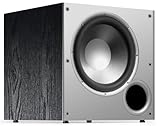


 PSW10 fills in the bottom end of your home theater system. Relieve your main speakers from performing bass duty and let them work on the mids and highs. PSW10 is a great addition to any subwooferless system and will bring your movie watching experience to the next level. All woofers feature a floor coupled downward firing port. This configuration brings you maximum bass impact while keeping the front of the cabinet as low profile as possible..../ Polk Audio PSW10 10-Inch Monitor Series Powered Subwoofer (Single, Black) / an used car

